Peerix Talk: P2P video app in 13 evenings
I wanted to build a P2P video chat app. Nothing fancy at first — just something that works and doesn’t rely on some company’s servers in the middle.
I gave myself 30 evenings (because this was strictly an after-work project), which felt generous for a side thing. It turned out I could’ve been more ambitious: with a local LLM as my pair programmer inside Zed, I shipped it in 13 days.
Here’s how that went down, what the AI actually helped with (and what it didn’t), and why I bother running models locally at all.
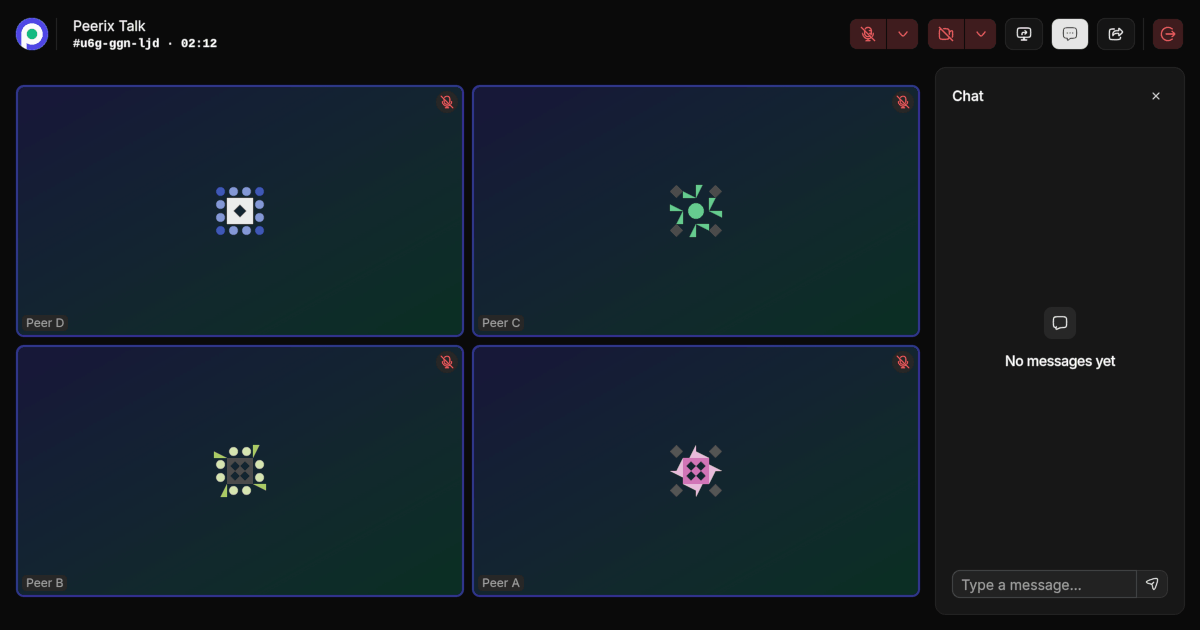
You can try Peerix Talk or look at the source on GitHub.
Why local AI?
I’m skeptical of sending my work prompts to some remote API and hoping for the best. Not because cloud models are bad — they’re often better — but I value not having my development process live on someone else’s servers.
There’s also the dependency question. If your workflow depends on a company’s API, that company can change pricing, rate limits, model versions, or just shut things down entirely. You’ve seen what happens when popular models get quietly updated and stop doing what they used to do. Local models are boring in the best way: you pin a version and it behaves the same tomorrow as it does today.
And yeah, money matters too. Running local models once you have the hardware is basically free per inference. No surprise invoices at the end of the month because one feature branch got a little out of hand.
Local LLMs have gotten really good this year. Not “replace a senior engineer” good, but “handle a side project without me getting frustrated” good. The main trade-off is that you occasionally need to nudge the model when it goes off track. I’m fine with that.
What the AI actually did for me
I don’t really “prompt” an AI and walk away. That approach tends to produce code that looks right until you try to extend it. My workflow was more like pairing with a junior developer who knows syntax cold but needs guidance on the bigger picture.
Here’s where it pulled its weight:
Asking the agent to weigh in. Whenever I had two directions to go, I’d describe both and ask what it thought. Sometimes it caught edge cases I hadn’t considered — more often it just helped me verbalize the trade-offs so I could decide faster.
Research and digging. When I needed to figure out how some unfamiliar API worked or reverse-engineer a behavior from docs and code, the agent was faster than opening ten browser tabs. It can read through source files, trace what’s happening, and summarize findings — much quicker than manual spelunking.
Doing the tedious parts. READMEs, changelogs, fixing typos — stuff that sits in “I’ll do this later” limbo until shipping day. The agent handled these as we went along, which was honestly a relief.
Keeping things consistent. Refactoring across multiple files without breaking style is annoying. Delegating it to the agent meant I didn’t have to think about it.
Code review. Asking the agent to look over my changes turned up actual bugs — off-by-one errors, unhandled states, things a human reviewer might also miss after staring at code all day. It also suggested improvements I hadn’t considered, which was a nice surprise.
Tests — and this surprised me. I’ve always found writing tests monotonous. But letting the AI generate the structure while I defined what needed covering changed my relationship with them. The mechanical part was gone; I just had to make sure the tests actually made sense.
How it unfolded
Days 1–5: Getting something on screen
I went with React + TypeScript + Vite + TailwindCSS, plus shadcn/ui for components. This isn’t exactly my taste — I don’t have a special love for React — but it’s what everyone uses these days, so I figured I’d just roll with the crowd.
First pass was the basic screens: a lobby where you enter your name and room, a room view with a session timer, and a chat panel that collapses on mobile. Day 5 turned out to be the most annoying UI problem of the whole project — building a video grid that resizes dynamically when peers join or leave, plus supporting pinned tiles and highlighting whoever’s talking. That one took longer than I’d admit.
Days 6–9: Making it actually work
With the shell done, I started wiring up real media. Camera and mic access worked fine on first try (unusually), but handling the case where a user denies permissions or has no camera plugged in took some thought — you can’t just crash with an ugly error.
For WebRTC itself, I used Peerix as the connection layer. The app uses a full-mesh topology: every peer connects directly to every other peer in the room. No central media server.
Days 10–13: Finishing touches
Data channels over WebRTC gave me serverless chat between peers — just another socket to wire up. Then I set up Playwright for E2E tests so I wouldn’t accidentally break something while adding new features.
I also added support for different signaling backends (MQTT, NATS, SSE) so the app isn’t locked into one way of connecting peers behind the scenes.
Day 13 was PWA setup — manifest file, icons, themes. The goal: make it installable on phone and desktop without going through an app store.
What I actually learned from this
Doing this without AI would’ve taken longer — maybe 30 days, maybe more. The biggest difference wasn’t just raw speed though; it was being able to stay focused on the interesting parts instead of getting bogged down in boilerplate.
Having an agent that could review my changes and write test scaffolding gave me enough confidence to move quickly without constantly second-guessing myself.
Wrap up
Local AI isn’t magic and it won’t replace you — but used as a tireless junior dev, it’s genuinely useful. It handles the repetition so you can focus on architecture decisions and actual problems.
If you want to try it or mess around with the code:
Stack used: React, TypeScript, TailwindCSS, shadcn/ui, Peerix (WebRTC), Playwright, Zed Editor, Local LLMs
Comments